Why Is Your Evening Screen Time Still So Harsh on Your Eyes?
You settle in after a long day, phone in hand, scrolling through product reviews before bed. But the glare feels harsh, your eyes tire fast, and sleep feels harder to reach. You’re not alone—and it’s not just about screen time. The real issue might be how you’re viewing those reviews. Small seasonal shifts in light and routine change everything. Let’s talk about how smarter tech habits can make your evenings calmer, clearer, and more comfortable—without giving up your nightly scroll.
The Cozy Ritual That’s Actually Straining Your Eyes
There’s something comforting about unwinding at the end of the day with your phone or tablet. Maybe you’re comparing blenders for a weekend recipe, checking customer photos of a new bath mat, or reading about a vacuum that promises to handle pet hair. It feels harmless—productive, even. But if you’ve noticed your eyes feeling dry, heavy, or sore after these little sessions, it’s not in your head. That cozy ritual might be working against you.
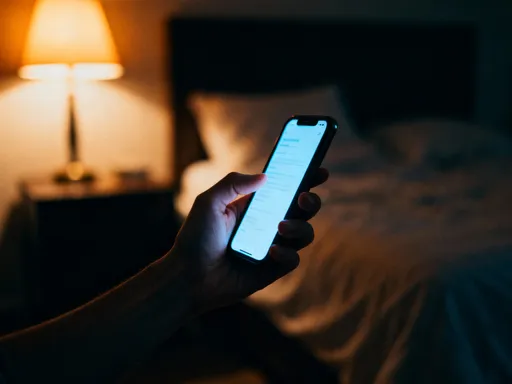
When daylight fades, many of us turn to indoor lighting that’s softer and warmer than sunlight. But our screens? They stay just as bright as they were at noon. This contrast—dim room, bright device—forces your eyes to constantly adjust, like switching between a candlelit room and a spotlight. Over time, that effort adds up. You may not realize it in the moment, but your pupils are shrinking and expanding rapidly, your tear film is evaporating faster, and your brain is processing more visual noise than it needs.
And here’s the thing: this isn’t just an annoyance. Chronic eye strain can lead to headaches, blurred vision, and even disrupted sleep patterns. The blue light from screens, especially in low-light environments, signals your brain to stay alert—exactly the opposite of what you want when you’re trying to wind down. So while you’re just trying to find the best coffee maker, your body is getting mixed messages: Relax… but also, stay awake. It’s no wonder you toss and turn later.
What makes this even trickier is how natural the habit feels. You’ve finished the dishes, the kids are asleep, and finally, there’s a quiet moment. Of course you reach for your phone. But that moment of peace shouldn’t come at the cost of your comfort. The good news? You don’t have to give up browsing. You just need to rethink how you do it—especially as the days get shorter and we spend more evenings indoors.
How Seasonal Light Changes Impact Your Screen Experience
Think about how different your home feels in June versus December. In summer, sunlight pours in late into the evening. Even if you’re on your phone after dinner, there’s still ambient light in the room—natural, soft, and balanced. That background glow helps your eyes handle screen brightness without working overtime. But in the fall and winter, the sun sets early. By 6 p.m., it’s dark outside, and you’re likely relying on lamps, ceiling lights, or candles. These sources don’t provide the same even illumination, and they often create shadows or uneven brightness in the room.
Now add your phone to the mix. Suddenly, that small rectangle in your hand becomes the brightest thing around. Your eyes lock onto it, struggling to adjust between the bright screen and the darker surroundings. This is called the anchoring effect—your visual system uses the brightest light source in a room as a reference point. When your phone is that source, your eyes stay in ‘daytime mode,’ even if your body is ready for bed.
But it’s not just about brightness. Light also affects your circadian rhythm—the internal clock that tells your body when to sleep and when to wake. This rhythm is highly sensitive to blue light, which is abundant in digital screens. During the day, blue light helps keep you alert and focused. But at night, it tricks your brain into thinking it’s still daytime, delaying the release of melatonin, the hormone that helps you fall asleep.
Studies show that even short bursts of screen time in the evening can shift melatonin levels by 30 minutes or more. That might not sound like much, but over time, it adds up to real sleep disruption. And the effect is stronger in darker months, when we’re already getting less natural daylight. So when you’re scrolling through reviews in a dim room during winter, your body is getting a double whammy: less morning light to set your clock, and more evening light to confuse it.
The takeaway? Seasonal light changes aren’t just about mood or energy—they directly shape how your eyes and brain respond to technology. And once you understand that, you can start making small adjustments that make a big difference in how you feel.
The Hidden Problem with Product Review Viewing at Night
It’s easy to assume that screen strain is just about time—too much scrolling. But what you’re looking at matters just as much as how long you’re looking. Product review pages, while helpful, are often designed for maximum engagement, not eye comfort. Think about it: bright white backgrounds, high-contrast photos, flashing banners, and tiny text. These elements grab attention during the day, but at night, they can feel overwhelming.
Take customer photos, for example. A single product might have dozens of images—some bright, some dark, some with glare. As you swipe through them, your eyes have to constantly refocus and readjust. That rapid visual processing keeps your brain active, making it harder to relax. And many review sites use auto-playing videos or pop-up ads that suddenly flood the screen with light. Even if they’re only on for a second, that sudden burst can trigger eye fatigue and disrupt your sense of calm.
Then there’s the text. Reviewers often write long, detailed posts with small fonts and minimal spacing. Reading that in low light forces you to squint or lean closer, which strains the muscles around your eyes. And if the background is white or light gray, the contrast with the dark text creates a ‘halo effect,’ where letters seem to blur or shimmer. This isn’t just uncomfortable—it can make it harder to absorb the information you’re actually there for.
Even the way we shop has changed. Instead of browsing a single store or catalog, we now compare multiple sites, read dozens of reviews, and watch video demos—all in one sitting. That ‘just one more page’ habit means we’re exposing our eyes to more visual stress than ever before. And because we’re doing it in the quiet of the evening, when our bodies are primed for rest, the mismatch is even more pronounced.
So the next time you feel frustrated trying to choose between two similar products, ask yourself: Is it the decision that’s hard—or is it the way you’re seeing it? The design of these pages isn’t meant to harm you, but it’s not designed with nighttime comfort in mind, either. And that’s something we can change.
Real-Life Moments: When Scrolling Feels Like a Chore
We’ve all been there. It’s 9 p.m., you’re finally in bed, and you remember you need to order a birthday gift for your sister. You open your browser, search for the item, and suddenly you’re lost in a sea of options. One site has great prices but tiny text. Another has beautiful photos but loads slowly. Your eyes start to burn, and your head feels heavy, but you can’t stop—you need to make a decision.
Or maybe your teenager mentions a new science project and asks if you can buy a special kit online. You promise to look it up, so after dinner, you pull out your tablet. But the product description is packed with technical terms and small print. You zoom in, then out, then in again. By the time you find what you need, you’re more tired than when you started.
Here’s another common one: You’re shopping for a new comforter. You want something soft, machine-washable, and the right size. You read five reviews, swipe through ten photos, and compare prices across three stores. Sounds simple, right? But after 20 minutes, your neck hurts, your eyes are dry, and you’re not even sure what you wanted anymore. That calm moment of decision-making has turned into a mental marathon.
And let’s not forget the ‘quick check’ that turns into a spiral. You just wanted to see if a coffee maker was on sale. But then you clicked on a review, then another, then a video demo, then a related product. Before you know it, an hour has passed, and you’re wide awake—when all you wanted was to relax.
These moments aren’t just about poor choices or lack of focus. They’re about the way technology interacts with your environment and your body. When you’re tired, your eyes are less resilient. When the room is dark, every pixel feels brighter. And when you’re trying to make a thoughtful decision, visual stress makes it harder to think clearly. The irony is that these tools are meant to make life easier—but without small adjustments, they can end up making it harder.
Simple Tech Tweaks for Gentler Evening Viewing
The good news? You don’t have to stop browsing at night. You just need to make a few small changes that protect your eyes and support better sleep. And the best part? Most of these tweaks take less than a minute to set up—and you’ll notice the difference right away.
Start with dark mode. Many shopping apps and websites now offer a dark theme, where white backgrounds are replaced with soft blacks or grays, and text is light-colored. This reduces screen glare and lowers overall brightness, making it easier on your eyes. If the app doesn’t have a built-in dark mode, you can often enable system-wide dark mode in your phone or tablet settings. It won’t change every site, but it helps a lot.
Next, turn on a blue light filter. Most devices have a ‘night mode’ or ‘warm light’ setting that reduces blue tones in the evening. You can set it to turn on automatically at sunset or during specific hours. This doesn’t make the screen dimmer, but it shifts the color to a warmer, more amber tone—closer to candlelight than daylight. Your eyes will thank you, and your brain will get the signal that it’s time to wind down.
Adjust your brightness settings too. Instead of leaving your screen at full brightness, lower it to match your room’s lighting. A good rule of thumb: if the screen feels like a spotlight, it’s too bright. You can set up an automatic brightness schedule so your device dims in the evening without you having to think about it.
And don’t forget text size. Zooming in on small text reduces eye strain and helps you read more comfortably. Increase the default text size in your device settings so you don’t have to pinch and zoom every time. Many browsers and apps respect this setting, so it works across platforms.
Finally, consider using a reading mode when available. Some browsers have a ‘reader view’ that strips away ads, images, and clutter, leaving only the text in a clean, easy-to-read format. It’s perfect for long reviews or product descriptions. Even if you’re not reading an article, you can often activate it and save your eyes from visual overload.
Building a Calmer Digital Routine with Seasonal Awareness
Just like we switch from sandals to boots or swap iced tea for herbal tea, we can adapt our tech habits to the season. Winter isn’t the time to fight the dark—it’s the time to work with it. And that starts with being intentional about when and how you use your devices.
One of the most effective changes? Move your browsing earlier in the day. If you can, save product research for the afternoon or early evening, when there’s still natural light in your home. Even on cloudy days, ambient light helps balance screen brightness and supports better focus. You’ll make decisions more clearly, and you won’t bring visual stress into your bedtime routine.
If evening browsing is unavoidable, create a tech wind-down window. Set a time—say, 8 p.m.—when you switch to gentler settings: dark mode on, brightness low, blue light filter active. Treat it like a nightly ritual, just like brushing your teeth or brewing tea. Over time, your body will start to associate these cues with relaxation.
You can also prepare shopping lists during the day. Jot down what you need in the morning or at lunch, so you’re not starting from scratch at night. Then, when you do go online, you’re focused and efficient—no endless scrolling, no decision fatigue.
And if you’re shopping for gifts or big purchases, consider batching your research. Instead of checking one site each night, dedicate one evening a week to compare options. Take notes, save links, and make decisions then. That way, you’re not constantly reopening the same tabs, re-reading the same reviews, and re-straining your eyes.
These habits aren’t about restriction. They’re about respect—for your time, your energy, and your well-being. When you align your tech use with the natural rhythms of the season, you create space for more comfort, clarity, and calm.
A Smarter, Softer Way to Connect with Technology at Night
Technology should make life easier, not harder. It should help you find the perfect gift, upgrade your kitchen, or learn something new—without leaving you with a headache or a sleepless night. The truth is, we don’t need to choose between staying connected and staying comfortable. We just need to use our devices with a little more awareness.
Those small changes—dark mode, blue light filters, better brightness—aren’t just technical fixes. They’re acts of self-care. They say, I matter. My comfort matters. My rest matters. And in a world that often feels too fast, too loud, too bright, that’s a powerful message.
When you adjust your screen settings, you’re not just protecting your eyes. You’re creating a gentler digital environment—one that supports better sleep, clearer thinking, and more mindful choices. You’re teaching your body that it’s safe to relax, that it’s okay to slow down, that the day can end without a screen fight.
And over time, these small shifts add up to something bigger: a sense of control. You’re not at the mercy of bright lights or endless scrolling. You’re making choices that honor your needs, your rhythm, and your season. Whether it’s fall, winter, spring, or summer, you can find a balance that works for you.
So tonight, before you reach for your phone, take a breath. Ask yourself: Can I make this easier on my eyes? Maybe it’s turning on dark mode. Maybe it’s lowering the brightness. Maybe it’s deciding to wait until tomorrow. Whatever you choose, know this: you’re not alone, and you don’t have to do it all at once. Just one small change is enough to start feeling better—tonight.